
1001 TVs ऐप का उपयोग करके iPhone/Android/Mac/Windows PC से Apple TV पर वीडियो मिरर कैसे करें
एप्पल टीवी यह अपने सहज इंटरफ़ेस, Apple उपकरणों के साथ निर्बाध एकीकरण और उत्कृष्ट दृश्य अनुभव के लिए जाना जाता है। AirPlay Apple उपयोगकर्ताओं के लिए सामग्री को मिरर करना आसान बनाता है, जबकि Android, Windows और अन्य प्लेटफ़ॉर्म का उपयोग करने वालों को अक्सर एक विश्वसनीय समाधान खोजने में कठिनाई होती है।.
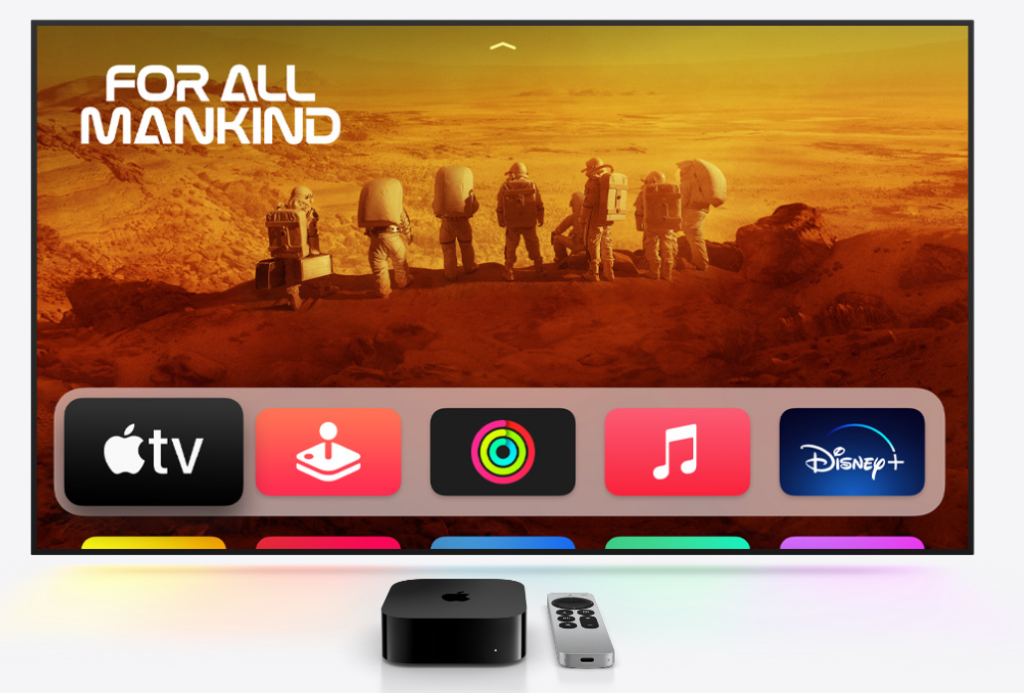
वहीं पर 1001 TVs ऐप एक शक्तिशाली स्क्रीन मिररिंग ऐप आता है जो आपको अपने डिवाइस से स्क्रीन कास्ट करने की सुविधा देता है। कोई भी उपकरण इसे एप्पल टीवी पर कनेक्ट करने से प्रक्रिया सरल और परेशानी मुक्त हो जाती है।.
स्क्रीन मिररिंग के लिए 1001 TVs को क्यों चुनें?
✔ किसी भी डिवाइस पर काम करता है – दर्पण से iPhone, iPad, Android, Mac या Windows PC
✔ आसान सेटअप – कुछ ही टैप में वायरलेस तरीके से कनेक्ट करें
✔ सहज और स्पष्ट – कम विलंबता, उच्च गुणवत्ता वाली मिररिंग, इसके लिए आदर्श गेमिंग, स्ट्रीमिंग या प्रस्तुतियाँ
✔ उपभोक्ता - अनुकूल इंटरफ़ेस – सभी के लिए सरल और सहज।
1001 TVs का उपयोग करके स्क्रीन को Apple TV पर मिरर कैसे करें
1. iPhone या iPad से मिरर करें
1) सुनिश्चित करें कि दोनों डिवाइस कनेक्टेड हैं एक ही वाई-फाई नेटवर्क.
2) इंस्टॉल करें और खोलें 1टीपी1टी आप दोनों पर आईफोन/आईपैड और एप्पल टीवी (ऐप स्टोर में “1001 TVs” खोजें)।.
📱 iOS संस्करण: ऐप स्टोर से डाउनलोड करें
3) अपने डिवाइस को कनेक्ट करने के लिए स्कैन करें एप्पल टीवी.
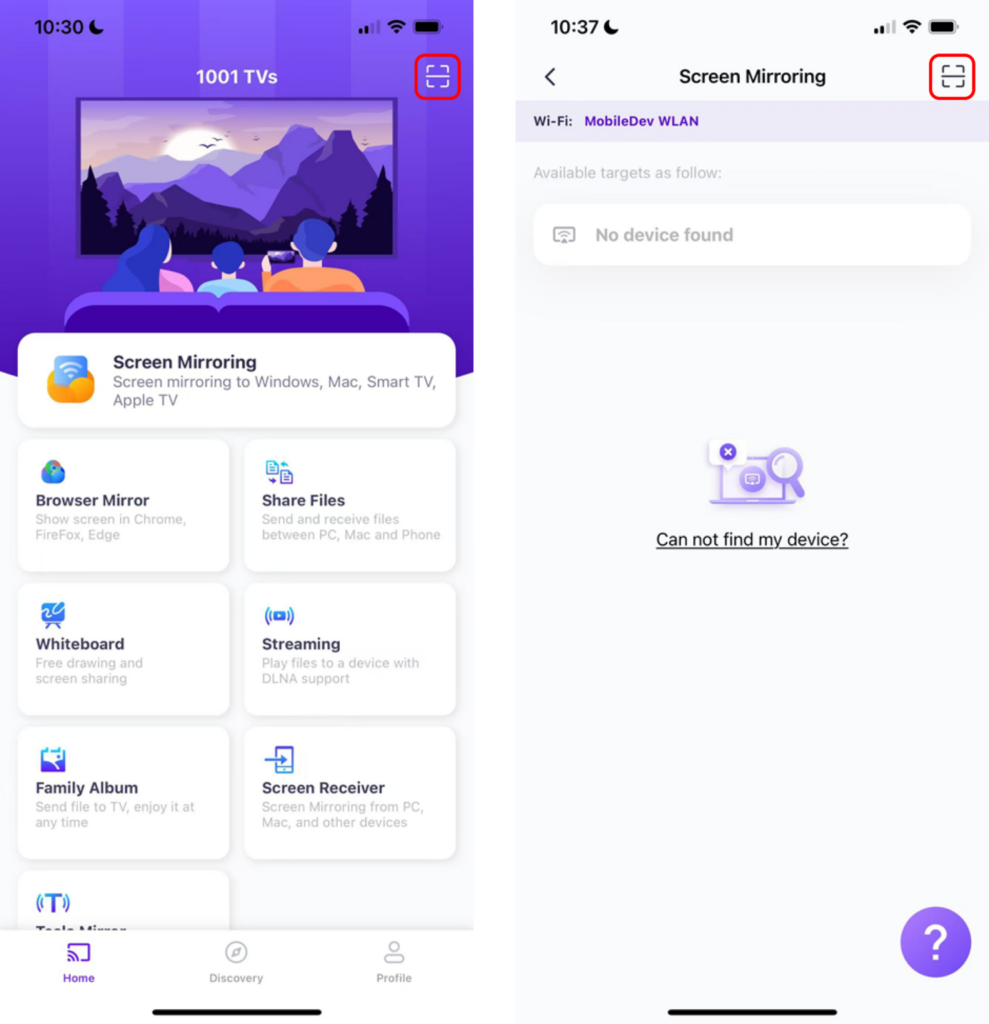
4) टैप करें “मिरर शुरू करें” ➜ “प्रसारण शुरू करें”
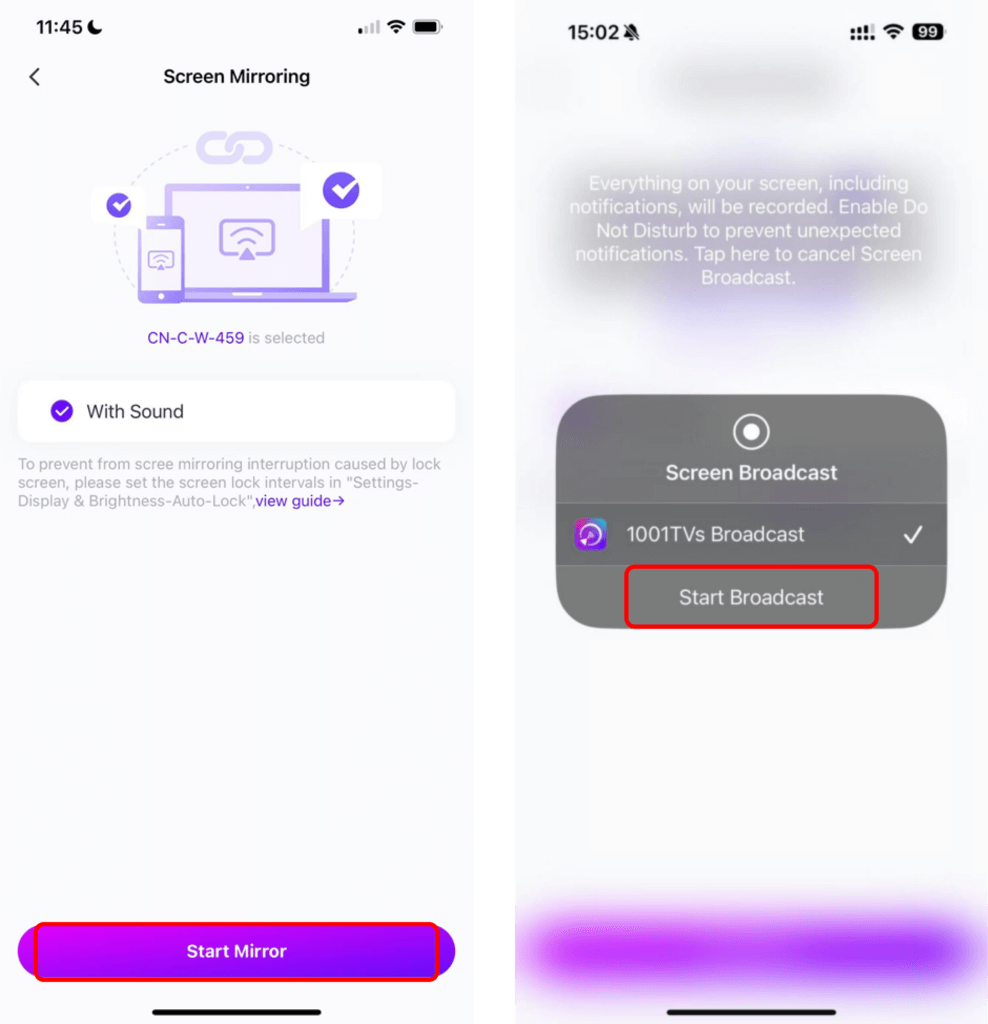
टिप्पणी: यह विधि बेहद कम विलंबता सुनिश्चित करती है—जो वीडियो स्ट्रीमिंग, लाइव इवेंट या स्लाइडशो प्रस्तुत करने के लिए एकदम सही है।.
2. एंड्रॉइड से मिरर करें
1) सुनिश्चित करें कि दोनों डिवाइस कनेक्टेड हैं एक ही वाई-फाई नेटवर्क.
2) इंस्टॉल करें और खोलें 1टीपी1टी आप दोनों पर एंड्रॉइड और एप्पल टीवी (गूगल प्ले स्टोर में “1001 TVs” खोजें)।.
📱 एंड्रॉइड संस्करण: Google Play से डाउनलोड करें
3) टैप करें “स्क्रीन मिरर” आपके एंड्रॉइड पर।.
4) अपना चुनें एप्पल टीवी उपलब्ध उपकरणों में से।.
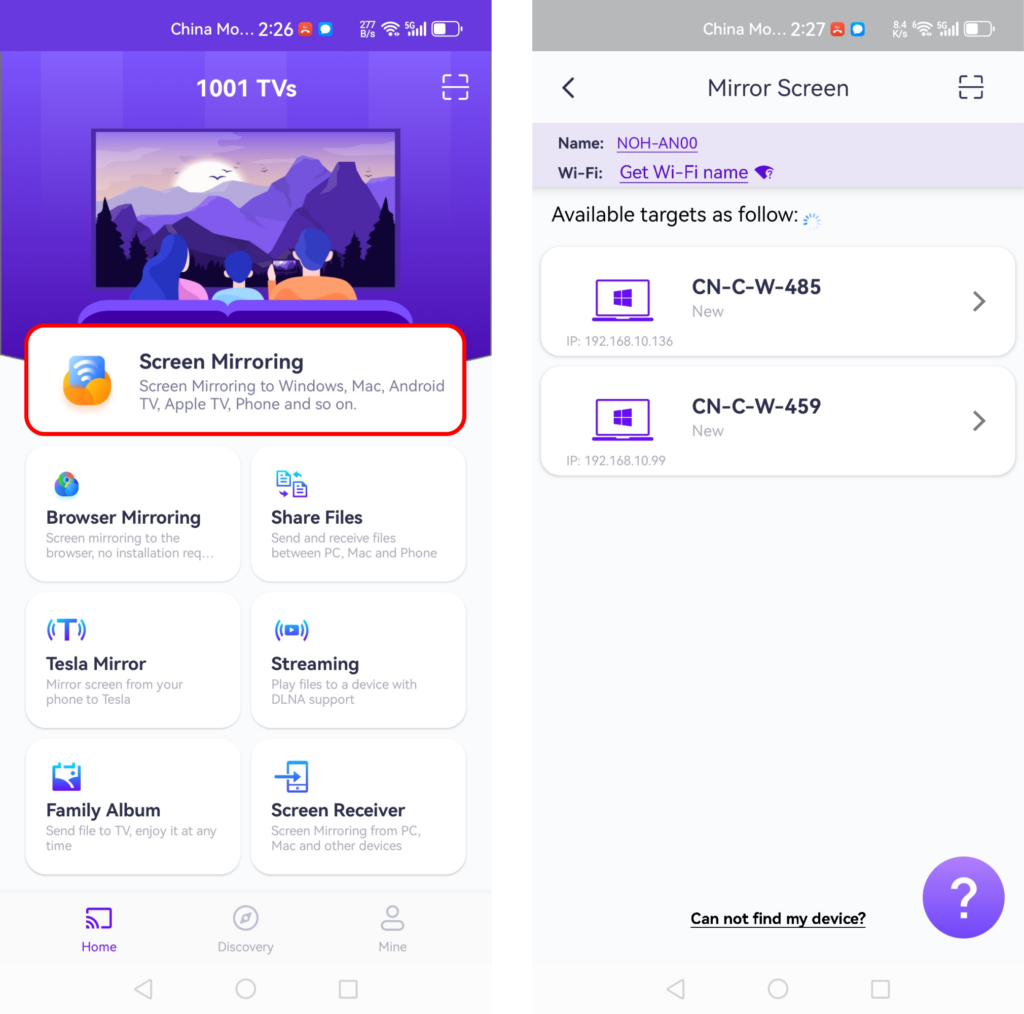
मिररिंग करने से पहले, सुनिश्चित करें कि आपने नोटिफिकेशन की अनुमति दे दी है ताकि आप नोटिफिकेशन बार में स्थिति देख सकें।.
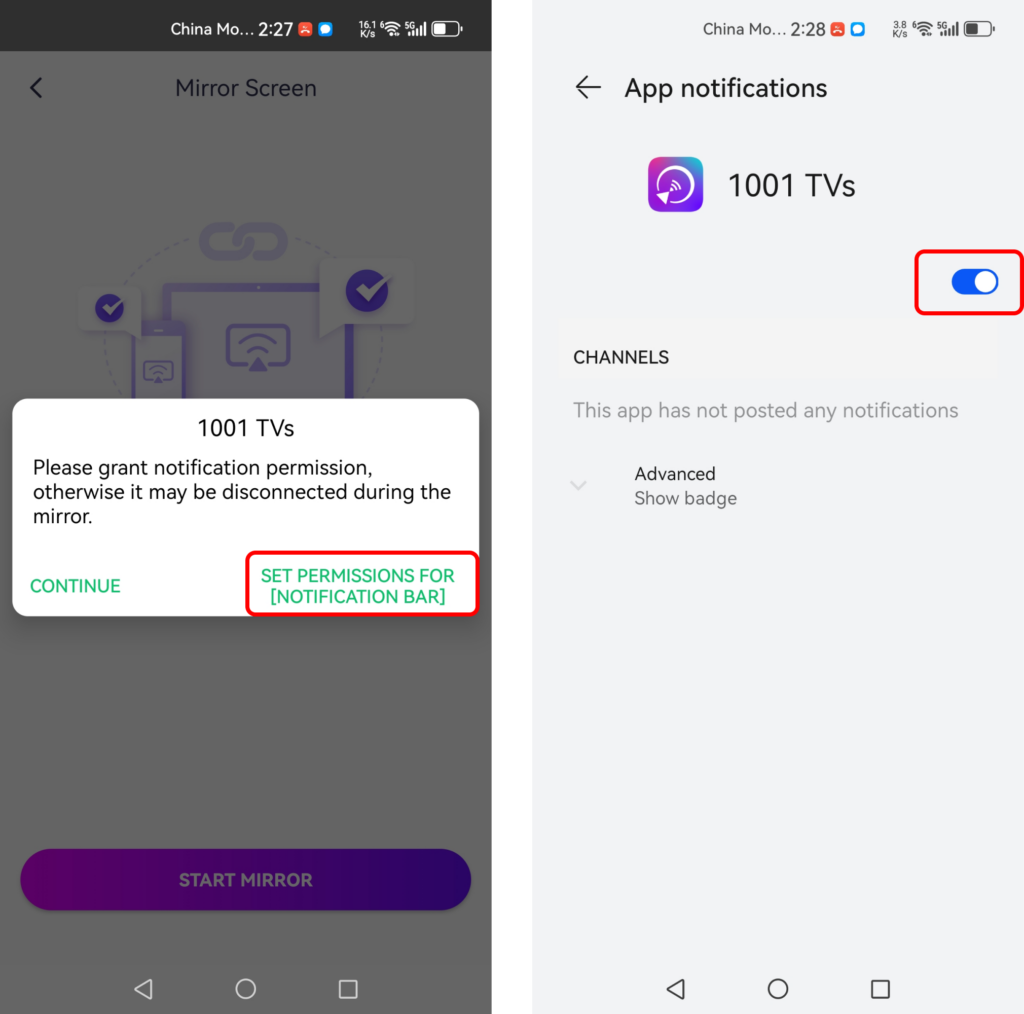
टिप्पणी: 1001 TVs एंड्रॉइड डिवाइसों के लिए ऑडियो और वीडियो कास्टिंग का समर्थन करता है, जो ऊर्ध्वाधर और क्षैतिज दोनों प्रकार की स्क्रीन के लिए एक सहज अनुभव प्रदान करता है।.
3. विंडोज पीसी से मिरर करें
1) सुनिश्चित करें कि दोनों डिवाइस कनेक्टेड हैं एक ही वाई-फाई नेटवर्क.
2) इंस्टॉल करें और खोलें 1टीपी1टी आप दोनों पर विंडोज पीसी और एप्पल टीवी.
📥 विंडोज़ संस्करण: विंडोज़ के लिए डाउनलोड करें
3) क्लिक करें “पीसी को टीवी पर मिरर करें“ अपने पर विंडोज पीसी और अपना चयन करें एप्पल टीवी.
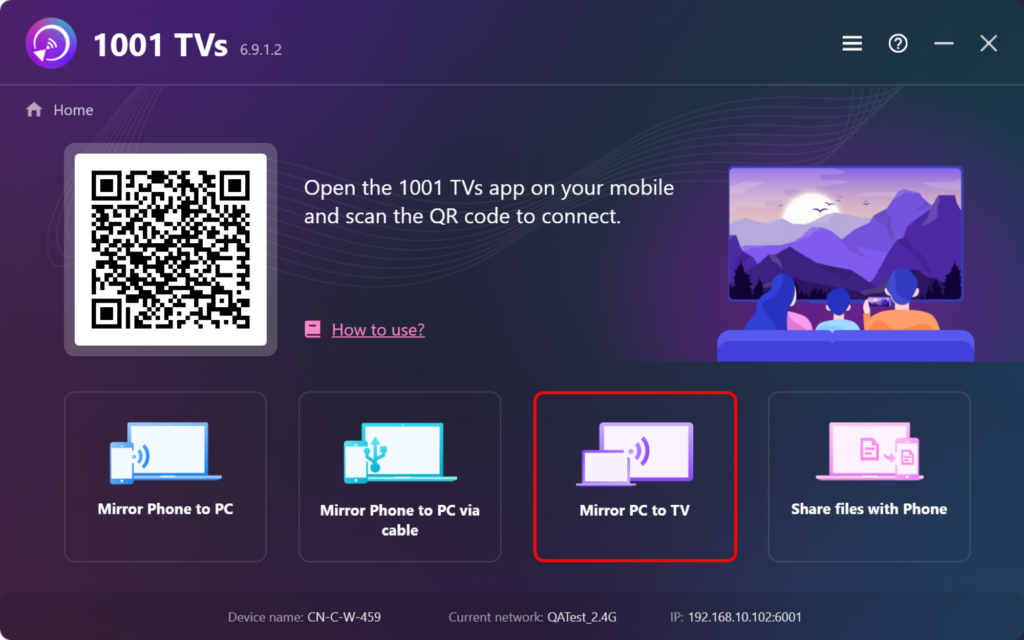
यह अनोखा क्यों है: अधिकांश ऐप्स के विपरीत, 1001 TVs विंडोज उपयोगकर्ताओं को Apple TV पर मिररिंग करने की सुविधा देता है।, यहां तक कि बड़ी स्क्रीन पर बेहतर वेब अनुभव के लिए ब्राउज़र मिररिंग को भी सक्षम किया गया है।.
4. मैक से मिरर करें
1) सुनिश्चित करें कि दोनों डिवाइस कनेक्टेड हैं एक ही वाई-फाई नेटवर्क.
2) इंस्टॉल करें और खोलें 1टीपी1टी आप दोनों पर मैक और एप्पल टीवी.
📥 मैक संस्करण: ऐप स्टोर से डाउनलोड करें
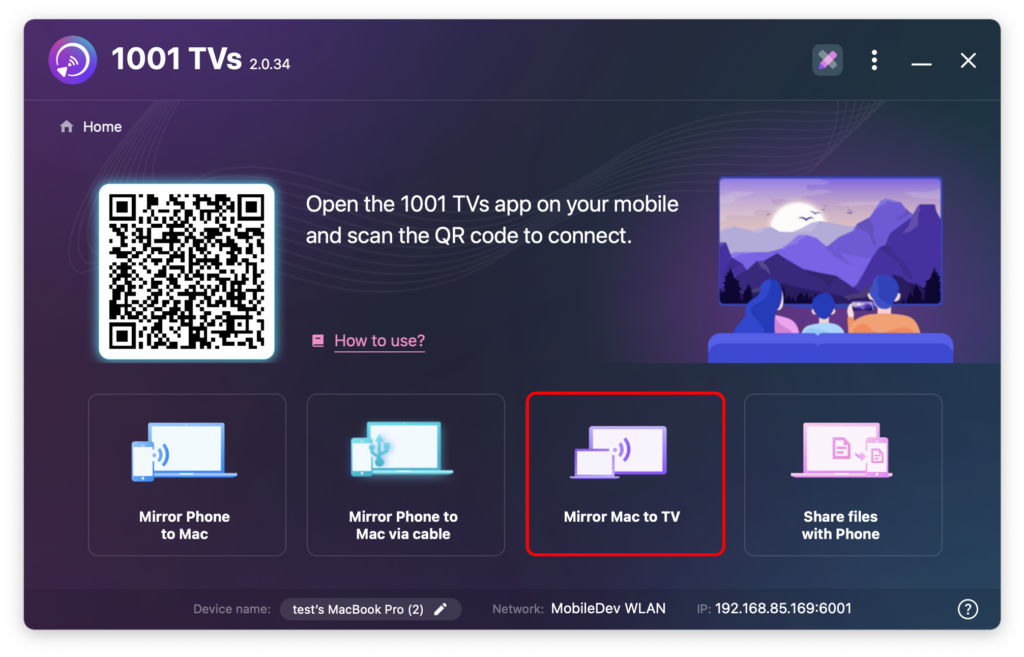
3) क्लिक करें “मैक की स्क्रीन को टीवी पर दिखाएं“ अपने पर मैक और अपना चयन करें एप्पल टीवी.
1001 TVs की अतिरिक्त विशेषताएं
- स्ट्रीमिंग समर्थनफ़ोटो, संगीत और वीडियो को आसानी से Apple TV पर स्ट्रीम करें।.
- यह हर जगह काम करता हैकई टीवी और स्ट्रीमिंग उपकरणों के साथ संगत।.
- विज्ञापन-मुक्तबिना किसी रुकावट के निर्बाध रूप से कास्टिंग का आनंद लें।.
- यूट्यूब कास्टिंगकुछ ही सेकंड में YouTube वीडियो को अपने टीवी पर कास्ट करें।.
- बहु-उपकरण समर्थनएक ही समय में कई उपकरणों को कनेक्ट और प्रबंधित करें।.
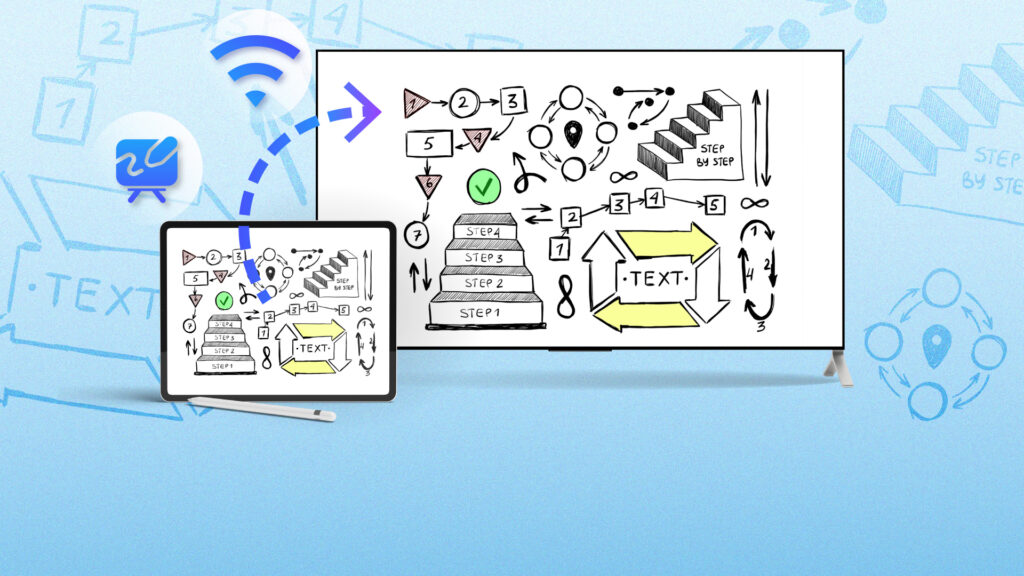
- व्हाइटबोर्ड मोडप्रस्तुतियों, बैठकों और विचार-मंथन सत्रों के लिए बिल्कुल उपयुक्त—अपने नोट्स को बड़ी स्क्रीन पर आसानी से साझा करें।.
अंतिम विचार
1001 TVs किसी भी डिवाइस पर Apple TV पर स्क्रीन मिररिंग को बेहद आसान बना देता है। अपने अपडेटेड इंटरफेस, भरोसेमंद परफॉर्मेंस और मल्टी-डिवाइस सपोर्ट के साथ, यह निर्बाध कास्टिंग और मिररिंग के लिए एक आदर्श टूल है।.
आज ही अपनी 1001 TVs यात्रा शुरू करें और Apple TV के बेहतर अनुभव का आनंद लें। ऐप अभी डाउनलोड करें और जानें कि iOS, Android या अपने कंप्यूटर से मिरर करना कितना आसान है!
आज ही 1001 TVs के साथ शुरुआत करें और अपने Apple TV अनुभव को निर्बाध बनाएं!
1001 TVs अभी डाउनलोड करें
📥 मैक संस्करण: ऐप स्टोर से डाउनलोड करें
📥 विंडोज संस्करण: विंडोज़ के लिए डाउनलोड करें
📱 iOS संस्करण: ऐप स्टोर से डाउनलोड करें
📱 एंड्रॉइड संस्करण: Google Play से डाउनलोड करें